Event Email Marketing: A Practical 2026 Guide for Packed In‑Person & Online Events
08/10/2026
Marketing Strategy
Guide your audience from invitation to attendance and follow-up. Learn how to plan event emails, tailor messages to registration status, and measure results beyond opens and clicks.

Event email marketing uses targeted campaigns to promote an event, encourage registration, and maintain contact afterward. It works alongside confirmation and logistics emails that help registered attendees prepare and participate, whether the event is a webinar, workshop, conference, or hybrid gathering. Each message serves a different purpose. Promotional emails explain who the event is for and why someone should attend. Confirmation emails verify a completed registration. Logistics messages provide practical details such as the venue, time zone, access link, or arrival instructions. Your email sequence should change when someone registers. Remove registered attendees from ticket-sales reminders for that event and send the information they need to attend. Afterward, tailor follow-ups to whether they participated, missed the event, or requested additional resources. This guide explains how to plan event email sequences, write useful messages, segment your audience, and measure registrations and attendance using clearly defined metrics. Sample schedules are illustrative starting points to adapt to your event’s format, audience, and booking cycle.
.png)
Event Email Strategy for Better Attendance


An event email strategy connects promotion, registration, attendee preparation, and follow-up. Each stage needs a different message: prospective attendees need a reason to register, while registered attendees need practical information that helps them participate.
Start with a clear event proposition, accurate registration data, and a plan for how messages change as someone moves from interested subscriber to confirmed attendee.
Key Takeaways
- Give each message a defined purpose. Build your email campaign strategy around registration, preparation, attendance, or follow-up.
- Separate promotion from attendee communication. Invitations and ticket offers serve a different purpose from confirmations, access details, and venue updates.
- Update audiences when someone registers. Remove confirmed registrants from ticket-sales reminders for that event and move them into the appropriate attendee sequence.
- Measure completed actions. Track registrations, ticket revenue where relevant, and verified attendance. Opens and clicks provide supporting context.
- Adapt timing to the event. A local workshop, webinar, and destination conference have different planning needs. Treat sample schedules as hypothetical starting points.
- Plan follow-up around participation. Attendees and people who registered but missed the event should receive different messages.
What Is Event Email Marketing?
Event email marketing is the use of email campaigns to introduce an event, explain its value, encourage registration, and maintain relevant contact afterward. It works alongside confirmation and logistics messages that help registered attendees prepare and participate.
A useful event email program separates three types of communication:
- Promotional messages: Announcements, invitations, speaker previews, and genuine ticket deadlines sent to eligible prospects.
- Confirmation messages: Registration or purchase acknowledgments that verify booking details and explain what happens next.
- Logistics messages: Arrival instructions, access links, time zones, accessibility information, and schedule changes for the relevant attendees.
This distinction helps keep messages useful. Someone who has already purchased a ticket needs their confirmation and arrival details, rather than another reminder to buy the same ticket.
How Email Supports Event Participation
Email gives organizers a way to explain the event and provide information recipients can return to when needed. It can help you:
- Show who the event is for and what participants can expect.
- Share confirmed agenda details, speakers, and registration options.
- Make booking confirmations and joining instructions easy to find.
- Communicate changes to the people affected.
- Deliver promised resources and request feedback afterward.
Results depend on the event’s appeal, audience fit, pricing, registration experience, and execution. Email should not be assumed to have a lower acquisition cost or higher return than every other channel.
Keep each message focused on a clear next step, such as viewing the agenda, registering, adding the event to a calendar, or accessing a session.
Define Your Event, Goals, and Audience
Before writing the first invitation, confirm the event’s purpose, format, capacity, and intended audience. Your event branding should communicate a consistent promise across the invitation, registration page, and attendee experience.
Record the details that shape the campaign:
- Event name, date, start and end times, and time zone.
- In-person, online, or hybrid format.
- Venue or joining arrangements.
- Intended audience and practical benefits.
- Ticket types, prices, and any genuine booking deadlines.
- Capacity, accessibility information, and support contact.
- Confirmed agenda details and information still to be announced.
Hypothetical example: A 150-person local workshop may need concise information about the session’s practical value, location, and available places. A 1,000-person hybrid conference may need separate communication for virtual participants, traveling attendees, speakers, and sponsors.
Set Goals With Clear Measurement Definitions
Choose goals that reflect the event’s purpose and available evidence. Illustrative targets might include selling a defined proportion of available tickets before a real deadline or improving attendance compared with a similar previous event.
Define the calculation before setting the target:
- Ticket sell-through: Tickets sold divided by tickets available for sale, multiplied by 100. State how complimentary places and refunds are handled.
- Registration-page conversion rate: Completed registrations divided by measured registration-page sessions during the same period, multiplied by 100. Specify whether registrations count bookings or individual attendees.
- Registrant attendance rate: Unique registrants who meet your attendance criterion divided by valid registrants in the same group, multiplied by 100. Define the criterion, such as an in-person check-in or a qualifying live online session.
- Cost per attributed registration: Defined campaign costs divided by registrations credited to that campaign under your chosen attribution method.
For hybrid events, report online and in-person attendance separately before combining them. Distinguish live participation from later recording views, and document how cancellations, walk-ins, and duplicate records are treated.
Use consistent tracking parameters on promotional links to identify campaign traffic. Google’s guidance on campaign URLs explains how UTM parameters distinguish sources, channels, and campaigns. Link tracking helps identify visits; completed registration and attendance records are still needed to measure outcomes.
Segment by Relevance and Registration Status
Start with audience differences that change the information someone needs:
- Past attendees and new prospects: Returning attendees may need to know what is different, while newcomers need more context.
- Local and traveling attendees: Travel planning requires different lead times and practical details.
- Online and in-person registrants: Joining links and venue directions should reach the correct groups.
- General attendees, speakers, sponsors, and VIPs: Each role may have distinct schedules and responsibilities.
- Registered and not yet registered: Confirmed attendees should leave the ticket-sales sequence.
Check registration status before each promotional send, accounting for any delay between your booking system and email platform. Apply appropriate consent and suppression rules to marketing messages, and keep essential attendee information focused on the event they registered for.
Afterward, use verified participation data to tailor follow-up. Thank attendees for joining, provide an appropriate recap to those who missed the event, and respect preferences for future promotions.
Free Brand Health Audit
Make sure your brand is built to sell
Search has changed. Your customers aren't just Googling anymore. They're asking ChatGPT, Perplexity, Gemini and other AI platforms what to buy, who to trust and which brands they should consider.
If your brand isn't showing up clearly in those answers, you're already losing opportunities. Our free Brand Health Audit shows you where your brand stands across traditional search, AI search and brand positioning.
Sample brand audit
Live preview
Traditional search
72
AI search (GEO)
34
Brand positioning
58
Core Event Email Types Across the Event Lifecycle


An event email sequence should change as someone moves from prospective attendee to registered participant. Promotional messages explain why to attend; confirmations and logistics messages help people follow through on their registration.
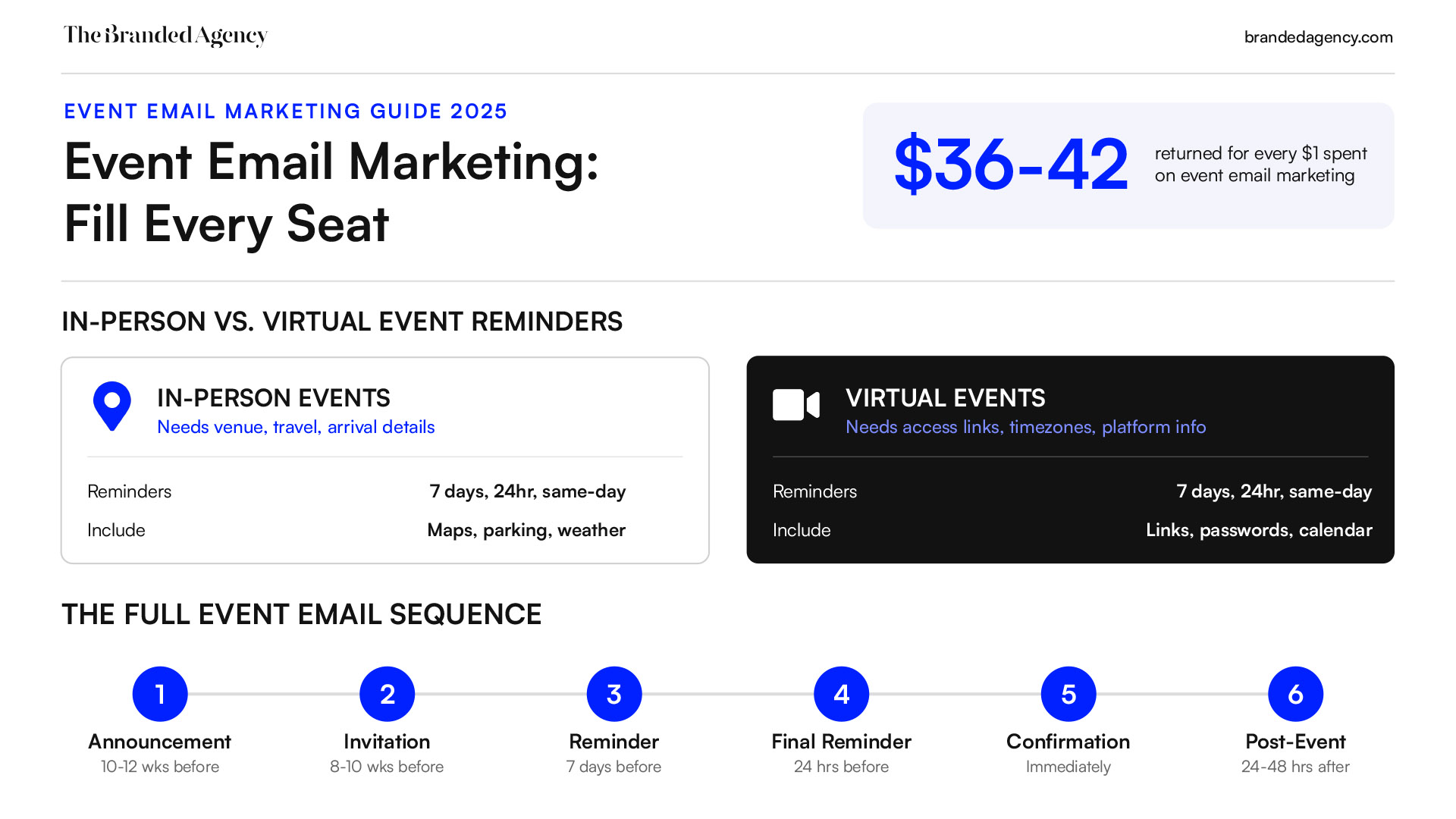
Build your email marketing strategy around six message types:
- Announcements that introduce the event.
- Invitations that explain the value and registration options.
- Promotional reminders for eligible people who have not registered.
- Confirmations that acknowledge a completed booking.
- Attendee reminders and logistics updates.
- Post-event resources, feedback requests, and relevant follow-ups.
The schedules and subject lines below are hypothetical examples. Adjust them to your event’s booking cycle, format, audience, and preparation requirements.
Announcement Emails: Introduce the Event
An announcement gives prospective attendees enough information to decide whether they are interested and should save the date.
For a hypothetical conference requiring travel, an announcement might go out 10–12 weeks ahead. A smaller webinar could have a shorter lead time. Choose the schedule according to how much notice your audience needs.
Include:
- The event name and central topic.
- Who the event is for.
- Confirmed date, location or online format, and time zone where relevant.
- A concise explanation of what participants can expect.
- One primary action, such as viewing details or joining an interest list.
Example subject line: “Save the date: [Event Name] in [City] on [Date]”
Distinguish an interest list from a confirmed reservation. Joining an announcement list should not imply that someone has secured a ticket or place.
Share speakers, sessions, and offers only when confirmed. If registration is already open, an announcement and invitation can be combined.
Invitation Emails: Explain the Value and Registration Details
An invitation helps someone decide whether the event is worth their time and, where applicable, the ticket price.
For a hypothetical webinar, the first invitation might arrive three weeks before the session. An event involving travel or internal budget approval may need considerably more notice.
A useful invitation includes:
- A subject line connected to the event’s topic or benefit.
- A clear description of the intended audience.
- Specific activities, topics, or takeaways.
- Date, time, time zone, location, and format.
- Ticket price and any genuine registration deadline.
- Confirmed speakers or relevant evidence from previous events.
- A primary registration link.
Example subject line: “[Event Name]: registration is open”
Example primary CTA: “View Details and Register”
Align the promise and visual identity with your event branding. The registration page should match the email’s dates, pricing, agenda, and availability.
Send invitations to eligible prospects who have not registered. Once a booking is confirmed, remove that person from the ticket-sales sequence for the event.
Promotional Reminders: Follow Up With Unregistered Prospects
Promotional reminders give interested people additional information or remind them of a real deadline. They serve a different audience from attendance reminders.
Useful reasons to follow up include:
- A confirmed session or speaker announcement.
- Answers to common registration questions.
- A genuine early-booking deadline.
- A verified change in ticket availability.
Example subject line: “Early-booking pricing for [Event Name] ends [Date]”
Check registration status before each send. Avoid sending “last chance to register” messages to people who have already booked, and stop sales messages when registration closes or tickets sell out.
Urgency should reflect a real condition. Do not imply limited availability or an approaching deadline without evidence.
Confirmation Emails: Acknowledge the Completed Booking
Send a confirmation promptly after the booking system verifies registration or successful payment, as applicable. A pending payment or waitlist request should receive an accurate status message instead.
Include:
- Event name and attendee details.
- Ticket type, attendance format, and booking reference.
- Confirmed date, time, and time zone.
- Venue or online access information, if available.
- A calendar link or file.
- Any required next step.
- A support contact and relevant booking-management link.
Example subject line: “Registration confirmed: [Event Name]”
For group bookings, distinguish the purchaser from individual attendees. Check who should receive payment information and who needs participation details.
If joining instructions are not ready, explain when and how they will arrive. Keep confirmations focused on the booking so essential information is easy to find.
Attendee Reminders: Help Registered Participants Prepare
Attendee reminders help people remember the event and arrive or connect with the information they need. Send them to confirmed participants in the appropriate attendance group.
A hypothetical in-person schedule might include a preparation email one week ahead and an arrival reminder the day before. A webinar might use reminders one day and one hour before the session. These are examples to test, not required frequencies.
For in-person attendees, useful details include:
- Venue address, entrance, and check-in time.
- Transport, parking, and accessibility information.
- What to bring or prepare.
- A concise agenda and support contact.
For online attendees, include:
- The correct joining link and access instructions.
- Start time and clearly identified time zone.
- Any software or account requirements.
- Calendar details and technical support information.
Example subject line: “Tomorrow: your joining details for [Event Name]”
Exclude canceled registrations and update reminders when someone changes ticket type or attendance format. Avoid sending a newly registered attendee several overlapping messages that repeat the same information.
Logistics Updates: Communicate Changes Clearly
Send logistics updates when something material changes, such as the room, venue, start time, or joining link. These messages should reach the affected attendees promptly rather than waiting for a scheduled reminder.
Use a direct subject line:
- “Venue change: [Event Name]”
- “Updated start time for [Event Name]”
- “Your revised joining link for [Event Name]”
State what changed, provide the correct information, and explain whether the attendee needs to act. Update calendar invitations, event pages, and queued emails so outdated details do not continue circulating.
For online events, distribute attendee-specific access links only to the intended recipients.
Post-Event Emails: Share Resources and Appropriate Next Steps
Post-event communication should reflect whether someone attended and what you promised to provide.
A hypothetical follow-up plan could include:
- Within 24–48 hours: Thank verified attendees and invite feedback.
- When resources are ready: Share permitted recordings, slides, or other promised materials.
- Later, where relevant: Send an optional next-event invitation to people eligible for marketing.
These messages can be combined when that creates a simpler experience.
Example attendee message: “Thank you for joining [Event Name]. Here are the session resources and a short feedback survey.”
Example missed-event message: “Sorry we missed you at [Event Name]. The session recording is now available if you would like to catch up.”
Confirm that recordings and other resources are available to the recipient’s ticket type before sending. Use photographs, quotes, and presentation materials only where you have the necessary permission.
Keep promised resource delivery distinct from promotion of future events. Attendance alone should not automatically enroll someone in every subsequent marketing campaign.
Check Delivery and Audience Rules Across the Sequence
Before launch, assign an owner to verify registration updates, cancellations, ticket changes, and suppression rules. Review your email platform’s authentication and unsubscribe setup against applicable provider guidance, including Google’s email sender requirements.
A reliable sequence delivers the right information as the attendee’s status changes. It should also stop messages that are no longer relevant.
Want to learn more about brand platforms, Brand Strategy and Brand Identity? Keep reading!
If you need help with your companies brand strategy and identity, contact us for a free custom quote.
Writing and Designing Effective Event Emails

An effective event email makes its purpose clear and gives the recipient the information needed to act. The design should reinforce your event branding, while the copy explains the next step.
Match that step to the recipient’s status. An invitation might ask someone to register, a confirmation might prompt them to add the event to their calendar, and an attendee reminder might provide joining instructions.
Subject Lines and Preview Text That Set Clear Expectations
A subject line should identify the message’s purpose and accurately reflect its contents. Use the event name, topic, location, or timing when those details help the recipient recognize its relevance.
Illustrative announcement subject lines:
- “Save the date: [Event Name], [Date]”
- “[Event Name] is coming to [City]”
- “Introducing our next customer workshop”
Illustrative invitation subject lines:
- “Registration is open for [Event Name]”
- “Explore [Topic] with us on [Date]”
- “Early-booking pricing ends [Date]”
Illustrative attendee subject lines:
- “You’re registered: [Event Name]”
- “Tomorrow: arrival details for [Event Name]”
- “Your joining link for today’s workshop”
Preview text should add useful information rather than repeat the subject line. For an invitation, it might summarize the topic and format. For a reminder, it might highlight the start time and time zone.
First-name personalization is optional. Use it only with reliable data and a fallback that reads naturally. A clear, relevant subject line does not depend on including someone’s name.
Clear Copy Focused on the Recipient’s Next Step
An invitation should quickly answer:
- Who is this event for?
- What will it cover?
- Why might the recipient want to attend?
- When and where will it happen?
- What does registration involve?
Be specific about what the event actually delivers.
Hypothetical workshop example: Instead of “Join us for insights and inspiration,” write “Use the workshop template to outline your next retention campaign, with time for questions.”
Only promise resources, activities, or outcomes that the event is designed to provide.
Use your brand voice guidelines to keep the tone consistent across invitations, confirmations, and follow-ups. A promotional email can express enthusiasm, while a venue-change notice should prioritize clarity.
Keep paragraphs short and give each message one primary action. Supporting links to an agenda, accessibility information, or assistance can remain when they help the recipient decide or participate.
Visual Design That Supports the Message
Use a clear reading order: purpose, essential details, supporting information, and the main action. Apply the same clarity to the email and its destination page so recipients do not encounter conflicting offers or event details.
There is no universal text-to-image ratio that guarantees conversions or inbox placement. Make the message understandable even when images do not load.
A practical design checklist includes:
- Keep dates, prices, venue details, and instructions as readable text.
- Add descriptive alt text to informative images.
- Use legible typography and sufficient contrast.
- Make links and buttons easy to identify.
- Compress images and avoid unnecessary visual clutter.
- Check light and dark mode rendering.
- Use accurate, approved speaker photos, testimonials, and event imagery.
Images from previous events should be presented as such. Do not imply that a past speaker, venue, or session is part of the upcoming program unless confirmed.
If you use a countdown, it must reflect a real deadline. Also state the deadline and time zone in text so the information remains clear if the countdown fails to display.
Mobile-Friendly Layouts and Calls to Action
Design for someone checking the message on a small screen. A simple layout, short sections, and comfortably spaced buttons can make essential information easier to find.
Use descriptive CTA text:
- Invitation: “View Tickets and Register”
- Confirmation: “Add to Calendar”
- Online reminder: “Join the Session”
- In-person reminder: “View Arrival Details”
- Follow-up: “Access the Recording”
Preview messages across the email clients your audience uses, including mobile and desktop versions where relevant. Test the links, registration form, calendar entry, and joining experience as well as the email itself.
Segmentation, Personalization, and Email Automation
Segmentation determines who needs which information. For event campaigns, registration status is one of the most important distinctions: people considering a ticket need different messages from people already attending.
Segmenting Your Event Audience
Start with groups that require a meaningful difference in content:
- Eligible prospects who have not registered: Invitations and relevant promotional follow-ups.
- Confirmed registrants: Booking details, preparation, and attendee reminders.
- Online and in-person attendees: Format-specific joining or arrival instructions.
- Past attendees and newcomers: Different levels of introductory context.
- Speakers, sponsors, and partners: Role-specific schedules and responsibilities.
- Canceled or waitlisted contacts: Accurate status updates without confirmed-attendee instructions.
For a hypothetical roadshow across several cities, segment by the selected location. Check that every reminder uses the correct venue, local time, and support information.
Clicks can help identify interest, but they do not establish registration or permission to receive marketing. Use booking records and communication preferences to determine eligibility.
Personalization That Makes the Email More Useful
Personalize information that helps someone choose or prepare. An attendee who selected a technical track may need different session details from someone attending leadership workshops.
Useful personalization can include:
- Selected event location or attendance format.
- Confirmed ticket type and included access.
- Sessions the attendee chose.
- Relevant preparation instructions.
- Resources promised for their registration category.
Keep dynamic content tied to reliable data, with a fallback for missing information. Do not expose unnecessary behavioral details or sensitive attendee information in the message.
Building an Automated Event Email Sequence
Email automation can coordinate scheduled promotion with messages triggered by registration and other changes. It still requires tested rules and an owner responsible for accuracy.
Hypothetical workflow for an event with a six-week promotion period:
- Six weeks before: Introduce the event to eligible prospects.
- Four weeks before: Send an invitation to contacts who have not registered.
- Two weeks before: Share a confirmed session highlight with eligible nonregistrants.
- After successful registration: Send a confirmation and remove the registrant from ticket-sales messages.
- Three days before: Send relevant preparation details to confirmed attendees.
- On the event day: Send joining or arrival information where useful.
- After participation records are checked: Send an appropriate attendee or missed-event follow-up.
Adapt this schedule to your booking cycle. A person registering shortly before the event should receive the information they need now, rather than every earlier message in the sequence.
Check registration status immediately before promotional sends where your platform supports it, and account for delays between connected systems. Test cancellations, ticket transfers, format changes, and duplicate records.
Measuring Success and Optimizing Event Email Campaigns
Event email reporting should connect communication to completed registrations and verified participation. Separate campaign engagement from event outcomes so each metric answers a clear question.
Define Your Registration and Attendance Metrics
Use consistent definitions throughout the campaign:
- Unique click-through rate: Unique recipients with a tracked click divided by delivered recipients for that email, multiplied by 100. Apply available automated-click filtering consistently.
- Email-to-registration rate: Unique delivered recipients who complete registration within a defined window divided by unique delivered recipients in the eligible campaign audience, multiplied by 100. State how records are matched.
- Registration-page conversion rate: Completed registration bookings divided by measured registration-page sessions during the same period, multiplied by 100. Report attendee places separately when one booking can include multiple people.
- Registrant attendance rate: Unique registrants who meet your attendance criterion divided by valid registrants in the same group, multiplied by 100.
- No-show rate: Valid registrants who do not meet that attendance criterion divided by the same valid-registrant denominator, multiplied by 100.
- Ticket revenue: Revenue from completed ticket purchases, with the treatment of refunds, taxes, and fees clearly stated.
Define attendance before the event. An in-person check-in, a live webinar connection, and a recording view are different activities. Report online and in-person participation separately where relevant, and state how cancellations and walk-ins are handled.
Understand Open-Rate Limitations
Tracked opens do not reliably show whether someone read an email. Apple Mail Privacy Protection can generate automatic opens that inflate reported engagement.
Klaviyo’s guidance on Apple privacy opens explains how affected events can be identified and why they do not necessarily represent a person reading the message.
Use opens as a secondary diagnostic. Prioritize completed registrations, verified attendance, useful replies, and other actions that match the message’s purpose. Monitor unsubscribes, bounces, and complaints alongside those outcomes.
Connect Campaign Links to Registration Records
Use consistent UTM parameters on promotional links to distinguish campaigns and email variants. Google’s campaign URL guidance explains how these parameters identify referred traffic.
UTM tags alone do not confirm registration or attendance. Connect campaign reporting with the booking system and participation records, and test tracking across any separate ticketing domain.
Keep attribution distinct from causation. A registration credited to email may also have been influenced by an advertisement, colleague, or previous event experience.
Test One Clear Hypothesis at a Time
Choose a test that addresses a meaningful decision:
- Does a topic-focused subject line produce more completed registrations than a general invitation?
- Does clearer pricing information help recipients complete booking?
- Does a concise arrival reminder reduce requests for directions?
Hypothetical example: Randomly divide eligible nonregistrants between two invitation versions. Keep timing, audience rules, design, and offer consistent while changing the opening message. Compare completed registrations over the same window, while monitoring unsubscribes and complaints.
Do not change both the message and send time and then attribute the result to one of them. Avoid declaring a winner from a small number of conversions or an early lead.
Record the hypothesis, audience, variants, measurement period, and outcome. Use the findings to improve later messages while accounting for changing ticket availability and proximity to the event.
Event Email Examples and Adaptable Templates

The following templates are hypothetical examples, not messages from documented campaigns. Replace the placeholders with confirmed details, remove anything that does not apply, and check that every link works before sending.
Keep the wording consistent with your brand voice guidelines, while making the purpose and next step clear.
Sample Event Invitation Email
Audience: Eligible prospects who have not registered.
Subject: Join us for [Event Name] on [Date]
Preview text: Explore [Topic] with [Relevant Audience] in [Location or Online Format].
Hi [First Name],
If you’re working on [Relevant Challenge], [Event Name] will explore practical approaches to help you take the next step.
Join us for:
- [Confirmed session or activity].
- [Confirmed speaker and relevant topic].
- [Discussion, demonstration, or networking opportunity].
Date: [Date]
Time: [Start–End Time and Time Zone]
Location: [Venue and City, or Online]
Tickets: [Price and Currency, or Free Registration]
[View Details and Register]
You can also [view the agenda] or contact [Support Contact] with questions.
[Organizer Name]
Include testimonials or previous attendance figures only when verified and relevant. Do not carry an invented attendance number into the published campaign.
Sample Registration Deadline Reminder
Audience: Eligible prospects who have not registered. Recheck registration status before sending.
Subject: Registration for [Event Name] closes [Date]
Preview text: Book by [Time and Time Zone] if you’d like to attend.
Hi [First Name],
Registration for [Event Name] closes on [Date] at [Time and Time Zone].
The event takes place on [Event Date] at [Venue or Online], with sessions covering [Confirmed Topics].
Ticket price: [Price and Currency]
Event time: [Start–End Time and Time Zone]
[Register Before the Deadline]
Already registered using another email address? Check your confirmation or contact [Support Contact] if you need help finding it.
[Organizer Name]
Use this template only for an actual registration deadline. If an early-booking price is ending but registration remains open, say that explicitly and provide the correct pricing details.
Sample Registration Confirmation Email
Audience: People whose registration has been successfully confirmed.
Subject: You’re registered for [Event Name]
Preview text: Your booking details and next steps are below.
Hi [First Name],
Your registration for [Event Name] is confirmed.
Booking reference: [Reference]
Ticket or attendance type: [Type]
Date: [Date]
Time: [Start–End Time and Time Zone]
Location: [Venue or Online]
[Add to Calendar]
[Joining or arrival instructions, or an accurate explanation of when these will be provided.]
To review your booking or request assistance, visit [Booking Management Link] or contact [Support Contact].
We look forward to welcoming you.
[Organizer Name]
Keep this message focused on the confirmed booking. Waitlisted contacts and people with pending payments need separate messages that accurately describe their status.
Sample Attendee Reminder Email
Audience: Confirmed attendees whose registration remains valid.
Subject: Tomorrow: your details for [Event Name]
Preview text: [Start Time and Time Zone], plus [joining or arrival] instructions.
Hi [First Name],
[Event Name] takes place tomorrow. Here are the details you’ll need:
Date: [Date]
Start time: [Time and Time Zone]
Expected finish: [Time and Time Zone]
[For an online event: joining link, access requirements, and technical support.]
[For an in-person event: venue address, entrance, check-in time, and relevant accessibility or transport information.]
Before the session: [Required preparation, or remove this line.]
[Join the Event / View Arrival Details]
Need help? Contact [Support Contact].
[Organizer Name]
Choose the content and CTA that match the recipient’s attendance format. Check the actual send date before using “tomorrow” or “today.”
Sample Thank-You and Recap Email
Audience: Verified attendees.
Subject: Thank you for joining [Event Name]
Preview text: Access [Available Resources] and share your feedback.
Hi [First Name],
Thank you for joining us at [Event Name].
We covered:
- [Actual topic or discussion highlight].
- [Actual demonstration or session takeaway].
- [Additional relevant highlight, if needed].
You can now access [slides, recordings, or other resources available to this audience].
[Access the Event Resources]
We’d also appreciate your feedback through [Feedback Survey Link]. Your responses will help us plan future sessions.
Thank you again,
[Organizer Name]
For registrants who did not attend, use a separate introduction such as: “Sorry we missed you at [Event Name]. Here are the resources available with your registration.”
Keep future-event promotions separate unless they are relevant and the recipient is eligible to receive them.
FAQs About Event Email Marketing
How many emails should I send for a single event?
There is no universal ideal number. Plan messages around genuine information needs, then determine which ones each person should receive.
An unregistered prospect may receive an announcement, invitation, and relevant deadline reminder. Once registered, they should leave that promotional sequence and receive confirmation, preparation details, and appropriate follow-up.
A short webinar may require fewer messages than a conference involving travel. Review total frequency across campaigns and automations, especially for people who register close to the event.
When is the best time to send event emails?
The best timing depends on your audience, time zones, booking habits, and the message’s purpose. There is no single weekday or hour that works best for every event.
Test promotional send times early enough to evaluate registrations over comparable periods. Send confirmations promptly after a successful booking, and communicate important changes when they occur.
Schedule attendee reminders around practical needs. Travel information needs more lead time than a webinar joining link.
How can I grow an email list for event promotion?
Offer a clear reason to subscribe, such as announcements about relevant workshops, early booking access, or a topic-specific event series.
Explain what people will receive and provide a straightforward way to opt out. On registration forms, distinguish necessary communication about the booked event from optional marketing about future events.
Partner promotions can direct people to your signup page without requiring partners to exchange attendee lists.
What should I do if people aren’t opening my event emails?
First, check whether messages are being delivered and whether open tracking is giving you a useful signal. Apple Mail Privacy Protection can generate automatic opens, so reported opens do not reliably establish readership. See Klaviyo’s explanation of Apple privacy opens.
Review clicks, completed registrations, replies, bounces, and complaints alongside opens. Then check sender recognition, subject-line clarity, audience relevance, and domain authentication.
Test a specific improvement rather than repeatedly resending to everyone labeled a non-opener. Any deadline or urgency in the message should be genuine.
How does email marketing differ for virtual and in-person events?
Virtual events need clear time zones, joining instructions, platform requirements, and technical support. In-person events need venue details, check-in instructions, accessibility information, and relevant travel guidance.
Hybrid events need separate communication paths for each attendance format. Check that ticket changes update the recipient’s sequence so they receive the correct information.
Should registered attendees still receive ticket-sales emails?
Remove confirmed registrants from general ticket-sales reminders for that event. Continue sending the booking information and attendee updates they need.
If an optional add-on or additional ticket is relevant, explain it clearly as a separate offer and apply the appropriate marketing preferences. Do not imply that an existing booking is incomplete.
How do I measure event registration and attendance rates?
Name the denominator whenever you report a rate.
For registration-page conversion, divide completed registration bookings by measured registration-page sessions during the same period, then multiply by 100. If one booking includes several people, report attendee places separately.
For registrant attendance, divide unique registrants who meet your attendance criterion by valid registrants in the same group, then multiply by 100. Define attendance, document how cancellations are handled, and separate live participation from recording views.
Use those definitions consistently when comparing events or campaigns.
Can I promote the next event in a follow-up email?
Yes, when the offer is relevant and the recipient is eligible for marketing. Deliver promised resources and important event information without making access conditional on subscribing to future promotions.
A focused recap or feedback request may be the most useful immediate follow-up. Introduce the next event when there is a clear reason for that audience to consider it.

Quincy Samycia
As entrepreneurs, they’ve built and scaled their own ventures from zero to millions. They’ve been in the trenches, navigating the chaos of high-growth phases, making the hard calls, and learning firsthand what actually moves the needle. That’s what makes us different—we don’t just “consult,” we know what it takes because we’ve done it ourselves.
Want to learn more about brand platform?

If you need help with your companies brand strategy and identity, contact us for a free custom quote.
We do great work. And get great results.
+2.3xIncrease in revenue YoY
+126%Increase in repurchase rate YoY


+93%Revenue growth in first 90 days
+144% Increase in attributed revenue


+91%Increase in conversion rate
+46%Increase in AOV


+200%Increase in conversion rate
+688%Increase in attributed revenue