

Server-Side Tracking: What Marketers Need to Know
10/02/2026
Marketing Services
A guide to server-side tracking — how it works, real benefits and trade-offs, implementation sequencing, and an honest look at realistic conversion recovery.

Server-side tracking routes event data through a server you control, giving marketers cleaner conversion signals, stronger privacy controls, and lighter pages. Instead of your browser firing pixels directly to Meta, Google, and every other ad platform, one trusted endpoint collects the data first and decides what gets sent where.
.png)


How Server-Side Tracking Works, and Key Takeaways
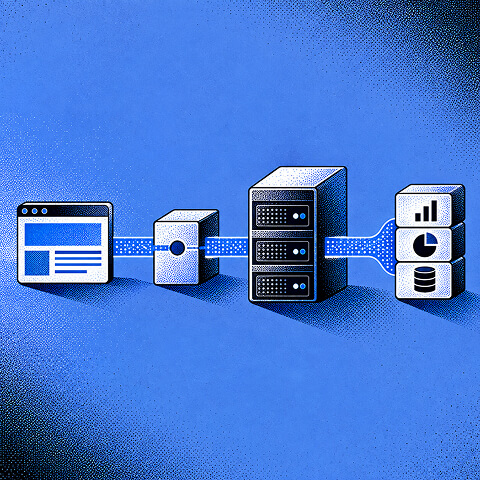
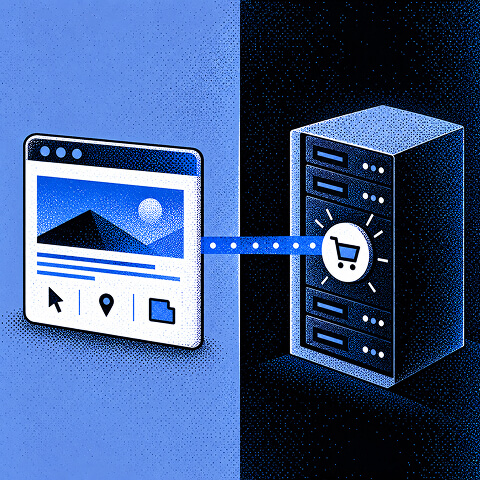

Three benefits drive adoption:
- Data accuracy: fewer conversions lost to ad blockers and browser restrictions
- Privacy control: you decide what gets hashed, stripped, or forwarded before it leaves your systems
- Page performance: fewer third-party scripts means faster load times
It's worth building if you're spending meaningfully on paid media and losing visibility into conversions you know are happening.
Key Takeaways
Server-side tracking improves conversion accuracy and privacy control by routing events through a server you own, but it demands a named owner, a first-party subdomain, and disciplined deduplication testing to deliver real results.
| Point | Details |
|---|---|
| Start with Meta CAPI | Fix your highest-leverage ad platform connection before building a full server container. |
| Host on a first-party subdomain | Most durable benefits depend on your own domain, not a shared or vendor-hosted endpoint. |
| Set modest recovery expectations | Server-side setups recover a meaningful slice of lost signal, not a full restoration. |
| Fix deduplication before scaling spend | Match event_id values across browser and server events to avoid double-counted conversions. |
| Assign a clear owner | The Branded Agency builds ownership and monitoring into every server-side project from day one. |
How Does Server Side Tracking Work?
The event flow has four stops. A visitor takes an action on your site (a purchase, a form fill, a page view). That event travels to a first-party collector endpoint, typically hosted on your own subdomain rather than a third-party domain. The collector, running as a server container, processes and enriches the data. From there, it forwards clean events downstream to ad platforms, analytics tools, and your data warehouse.
- Browser to collector: the page sends the event to your first-party endpoint instead of directly to Google or Meta
- Server container processes it: inside a Google Tag Manager server container, a "client" translates the incoming request into an event, which then triggers tags the same way a browser-based container would
- Enrichment happens: the server adds context, IP-based geolocation, or hashed identifiers before anything moves on
- Downstream delivery: the server makes its own server-to-server calls to ad platforms and writes to your warehouse
One limitation trips up teams constantly: UTM parameters, referrer data, and other page-context signals still have to originate in the browser. The server can enrich an event, but it can't invent context that was never captured client-side.
Pro Tip: Map your event flow on a whiteboard before touching Google Tag Manager. Most implementation delays come from teams debating "what triggers what" mid-build instead of settling it upfront.
Free Brand Health Audit
Make sure your brand is built to sell
Search has changed. Your customers aren't just Googling anymore. They're asking ChatGPT, Perplexity, Gemini and other AI platforms what to buy, who to trust and which brands they should consider.
If your brand isn't showing up clearly in those answers, you're already losing opportunities. Our free Brand Health Audit shows you where your brand stands across traditional search, AI search and brand positioning.

Sample brand audit
Live preview
Traditional search
72
AI search (GEO)
34
Brand positioning
58
Client-Side vs. Server-Side Tracking, and the Real Benefits and Trade-Offs


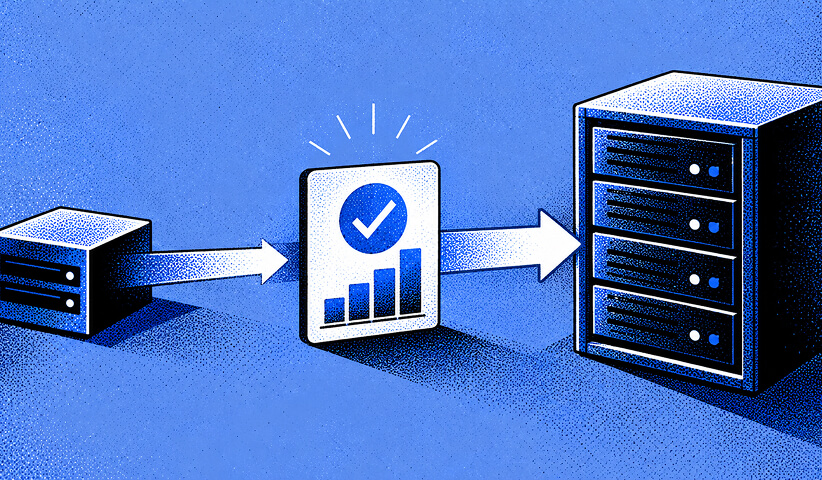
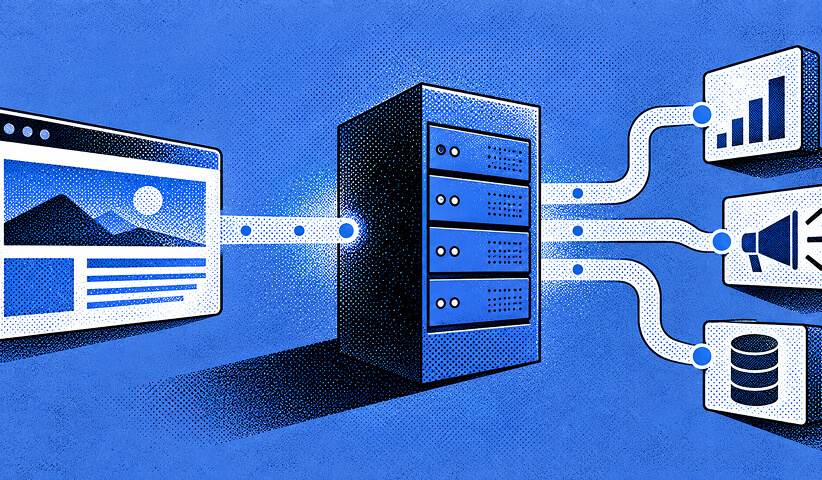
Client-Side vs. Server-Side Tracking: Which Wins?
Neither wins outright. Client-side tracking sits closer to the user, so it captures page context, UTM parameters, and in-session behavior that a server never sees on its own. Server-side tracking sits closer to the outcome: it's more reliable, easier to enrich, and far less vulnerable to ad blockers or browser tracking restrictions.
Most mature setups run both, splitting responsibility by event type:
- Keep UTM capture, scroll depth, and in-page interactions client-side, where browser context lives
- Move revenue events, offline conversions, and subscription changes server-side, where reliability matters more than nuance
- Let the server enrich and forward high-value events while the browser still handles lightweight, low-stakes signals
A checkout confirmation is a good server-side candidate. A homepage scroll event usually isn't worth the engineering effort to migrate.
What Are the Real Benefits and Trade-Offs?
The upside is genuine but bounded. Server-side setups improve match quality with ad platforms, recover conversions that ad blockers would otherwise erase, speed up pages by shedding third-party scripts, and let you enforce consent decisions in one place instead of scattered across dozens of tags.
Set expectations honestly, though. Hosting your collector on a first-party subdomain does increase cookie lifetime and reduce some signal loss, but realistic recovery is modest, not the dramatic 30% figure that circulates in vendor pitches. Treat any bold recovery promise with skepticism until you've measured your own baseline.
The trade-offs are real, too:
- Engineering time to build, configure, and validate the container
- Ongoing hosting costs, whether managed or self-run on cloud infrastructure
- A maintenance burden that grows as you add more downstream destinations
- The need for someone who actually owns monitoring, because projects without a clear owner tend to decay
Server-side tracking is not a set-it-and-forget-it upgrade. It's infrastructure, and infrastructure needs a caretaker.
Stalled at 'we set up the container' with no recovered conversions? Keep reading!
If you need baseline measurement before anyone touches a tag, contact us for a free custom quote.
How to Implement Server-Side Tracking, and When to Actually Adopt It

How Do You Actually Implement Server-Side Tracking?
Four patterns cover most real-world setups, and they're not mutually exclusive.
- Server-side tag management (sGTM): run a GTM server container on a first-party subdomain. This gives you centralized control over every downstream tag, but it demands the most setup and ongoing hosting attention.
- Direct server-to-server APIs: connect directly to Meta's Conversions API or Google's Measurement Protocol. This is often the fastest route to meaningful ad-platform ROI because you skip the container entirely and fix one specific leak.
- Analytics server SDKs and log import: platforms built server-native, like Matomo, support server-side SDKs and log import as an alternative to browser-based collection, useful if your analytics stack already lives outside the ad-tech ecosystem.
- Edge and hybrid patterns: running logic on Cloudflare Workers or a similarly thin edge layer suits latency-sensitive setups where a full server container feels like overkill.
Sequencing matters more than most teams assume. A common and sensible pattern:
- Start with Meta Conversions API to fix the highest-leverage ad platform first
- Measure the actual lift in match rate and recovered conversions
- Expand into a full sGTM container only once ad spend and engineering capacity justify the complexity
Building the full container before validating the smaller win is the single most common way teams overspend on this.
When Should You Actually Adopt Server-Side Tracking?
Not every business needs this yet. A few signals tell you it's time:
- Paid media spend is high enough that a few percentage points of conversion accuracy translate into real budget decisions
- A meaningful share of your traffic runs Safari or iOS, where tracking restrictions bite hardest
- You're seeing multi-day conversion windows where attribution keeps slipping
- Ad blocker usage among your audience is high enough to matter
Before you build anything, confirm three things: your consent handling is solid, you have baseline conversion and match-rate numbers to compare against, and someone specific owns the engineering work. Skipping the baseline is the most common regret teams report after migration.
Pro Tip: Start with Meta Conversions API alone and measure for two to four weeks before deciding whether a full server container is worth building. This captures most of the available gain with a fraction of the complexity.
Checklist and Pitfalls, Our Approach, the Uncomfortable Truth, and FAQ

What's the Implementation Checklist and Common Pitfalls?
A working runbook, in order:
- Set up a first-party subdomain with valid SSL, since hosting on your own domain is what makes most of the benefit real rather than theoretical
- Choose a hosting model, managed or self-run cloud infrastructure, and budget for ongoing costs, not just the initial build
- Wire in Consent Mode v2 so consent decisions are enforced centrally rather than tag by tag
- Strip or hash personally identifiable information before anything leaves your server
- Set data retention rules and document who owns them
- Test deduplication thoroughly before scaling ad spend against the new setup
Deduplication deserves its own warning. Browser pixels and server events need to share the same immutable event_id, or you'll double-count conversions and make your campaigns look far more effective than they are. Test across a meaningful volume of real purchase events, not a handful of manual test transactions, before trusting the numbers.
- Run an A/B test with a clear pre/post baseline, not a gut-feel comparison
- Assign a named owner for monitoring and alerting, not "the team"
- Track match rate and direct-traffic share to catch attribution drift early
Pro Tip: Direct traffic spiking right after a server-side migration is usually a sign that referrer data is getting lost somewhere in the pipeline, not a genuine traffic gain.
How The Branded Agency Approaches Server-Side Projects
The Branded Agency runs server-side tracking projects in a deliberate sequence, not a single big migration. We start with baseline measurement, so every client knows their real starting numbers before anything changes. From there, we implement the highest-ROI API connection first, usually Meta Conversions API, and only expand into a full server container once the data justifies the added complexity.
We track outcomes our clients can actually act on:
- Match rate improvement with ad platforms
- Recovered conversions compared to baseline
- Attribution shift across campaigns
- Site performance gains from reduced third-party scripts
Server-side tracking only pays off when someone owns it past launch day. We build the ownership model into the project scope from day one, not as an afterthought once things start drifting.
The Uncomfortable Truth About Server-Side Tracking
Most articles on this topic sell server-side tracking as a fix for the "cookiepocalypse," implying you'll recover most of what ad blockers and browser restrictions have taken away. That framing sets teams up for disappointment. The honest read of the evidence is that server-side tracking recovers a meaningful but modest slice of lost signal, not a full restoration.
The conventional advice also gets sequencing backward. Too many guides walk you straight into building a full GTM server container as the default starting point. That's expensive, slow, and often unnecessary. If your Meta ad spend is the pain point, fix Meta first with the Conversions API and measure before you touch anything else.
The real priority, though, is ownership. Every failed server-side project I've seen fail wasn't a technical failure. It was an org chart failure. Nobody owned monitoring six months after launch, and the whole thing quietly rotted. Before you write a line of container config, answer one question: who owns this next year? If you can't name a person, you're not ready to build.
Get Server-Side Tracking Built Right the First Time
Building server-side tracking without a team that lives in ad platforms every day is how projects stall at "we set up the container" and never reach "we recovered real conversions." The Branded Agency runs paid media management alongside implementation work, which means the person configuring your Meta Conversions API is the same person accountable for what your ad spend actually returns.
We sequence projects the way this article recommends: baseline first, high-ROI API second, full server container only when the numbers justify it. If your team needs the underlying infrastructure built too, our website development work covers the first-party subdomain, hosting, and SSL setup that makes the whole system durable instead of a one-off fix. If you're ready to stop guessing at conversion accuracy, reach out to The Branded Agency to scope a baseline measurement audit and see where your recovery opportunity actually sits.
Frequently Asked Questions
What is server-side tracking in simple terms? Server-side tracking means your website sends event data to a server you control first, instead of sending it directly from the browser to every ad platform and analytics tool. That server processes, cleans, and forwards the data downstream.
Does server-side tracking bypass consent requirements? No. Server-side tracking doesn't remove your obligation to collect valid consent; it actually makes consent enforcement easier because you control what gets forwarded from one central point instead of managing dozens of individual tags.
How is server side Google Tag Manager different from regular GTM? Regular GTM runs in the visitor's browser. A server-side Google Tag Manager container runs on your own infrastructure, receiving events from the browser and then making its own calls to vendors, which improves reliability and reduces the number of third-party scripts loading on the page.
What is Consent Mode v2 and how does it relate to server-side tracking? Consent Mode v2 is Google's framework for signaling user consent status to tags and platforms. When paired with a server container, you can enforce those consent signals centrally before any data leaves your system, rather than hoping every individual tag respects the setting correctly.
Should small businesses bother with server-side tracking? Only if paid media spend and lost-conversion volume justify the engineering investment. Many small businesses get more value from tightening broader marketing measurement first and revisiting server-side tracking once ad spend scales.
What causes duplicate conversions after implementing server-side tracking? Mismatched event_id values between the browser pixel and the server event are the most common cause. Test deduplication against a real volume of purchase events before trusting your reported numbers.
Sources
- An introduction to server-side tagging
- What is server-side tracking?
- Server-Side Tagging for Marketers 2026 | Prooflytics
- Server-Side Tagging 2026: Questions Before You Build
- Server-Side Tracking Explained: What It Is, How It Works, and Who Actually Needs It (2026)
Recommended

Quincy Samycia
As entrepreneurs, they’ve built and scaled their own ventures from zero to millions. They’ve been in the trenches, navigating the chaos of high-growth phases, making the hard calls, and learning firsthand what actually moves the needle. That’s what makes us different—we don’t just “consult,” we know what it takes because we’ve done it ourselves.
Want to learn more about brand platform?
If you need help with your companies brand strategy and identity, contact us for a free custom quote.
We do great work. And get great results.
+2.3xIncrease in revenue YoY
+126%Increase in repurchase rate YoY




+93%Revenue growth in first 90 days
+144% Increase in attributed revenue




+91%Increase in conversion rate
+46%Increase in AOV




+200%Increase in conversion rate
+688%Increase in attributed revenue







