Webflow Designer: Role, Skills, Hiring, and Career Opportunities in 2026
06/11/2026
Web Design / Web Dev

Discover how the right Webflow Designer can accelerate website launches, improve marketing agility, and help your business build scalable digital experiences that drive growth.

The web design landscape has shifted dramatically. In 2023, the U.S. Bureau of Labor Statistics reported over 216,700 web development and digital design job openings—and demand has only accelerated through 2026 as no-code platforms reshape how companies build their online presence.
.png)
The Role of a Webflow Designer


A Webflow designer sits at the intersection of visual design and front-end implementation. Unlike traditional web designers who hand off mockups to developers, Webflow designers build the actual site themselves using Webflow’s platform. This hybrid capability has made them invaluable to companies ranging from modern SaaS startups to enterprise brands like Dropbox and Dell.
This guide covers everything you need to know about the Webflow designer role—whether you’re a hiring manager looking to hire Webflow designers for your team or a designer considering a career pivot into this growing specialty.
Why Webflow designers matter in 2026:
- They eliminate the handoff gap between design and development
- They enable marketing teams to launch campaigns without engineering bottlenecks
- They combine UX thinking with technical execution in a single role
- They reduce time-to-market for professional websites and landing pages
The Demand for Webflow Designers in 2026
The 216,700 web development and digital design openings reported in 2023 represented just the beginning. Through 2024–2026, demand has continued climbing as no-code adoption moves from early adopter territory into mainstream business practice.
Companies in B2B SaaS, AI, recruiting, and creative agencies increasingly prefer Webflow for three reasons: speed to market, lower development cost, and direct marketing control over site updates. When a marketing team can iterate on landing pages without filing engineering tickets, the entire organization moves faster.
Today, Webflow designers fill full-time, part-time, and freelance roles globally. Specialized job boards list thousands of active job openings, and the competition for strong candidates has intensified as more companies recognize the strategic value of the role.
Three main demand drivers:
- Speed to market: Webflow builds launch faster than traditional code-only approaches
- Lower dev cost: One designer replaces the need for separate designer and developer resources
- Marketing autonomy: Teams can update sites without engineering dependencies
What Does a Webflow Designer Do?


A Webflow designer is a hybrid between a UI/UX designer and a front-end implementer—but one who specializes specifically in Webflow’s ecosystem. They don’t just create mockups; they design and build the entire website directly in Webflow’s visual interface.
The distinction from a generic web designer matters. A traditional web designer creates visual concepts in Figma or Sketch, then hands them to a developer for implementation. A Webflow designer handles both phases. They translate the design vision into a fully functional, responsive site without writing extensive code.
This makes Webflow designers ideal partners for marketing teams. When you need a campaign landing page live in 48 hours, a Webflow designer can deliver without waiting in an engineering queue. They collaborate directly with marketers, copywriters, and founders to ship marketing projects on tight timelines.
Typical day-to-day activities:
- Design responsive layouts in Webflow based on brand guidelines
- Build CMS structures for blogs, resource libraries, and case studies
- Implement custom animations and interactions
- Collaborate with marketing on campaign sites and landing pages
- Optimize images and site performance for speed
- Test across devices and browsers before launch
- Document systems and maintain component libraries
Key Skills of a High-Performing Webflow Designer
Not all Webflow designers deliver equal results. The difference between average and exceptional comes down to depth across several skill categories—technical platform mastery, design competency, front-end literacy, and communication.
Strong Webflow designers understand the platform deeply enough to solve complex problems without custom code. They can build CMS-driven blog archives with filtered cms collections, create pricing pages with conditional visibility, and implement Lottie-based animations that enhance rather than slow the user experience.
Beyond platform skills, they bring genuine UI/UX design proficiency. They understand typography scales, spacing systems, and mobile-first layout decisions. They know enough HTML, CSS, and JavaScript to embed custom code when Webflow’s built-in tools don’t cover a requirement.
Skills checklist for hiring managers and designers:
- Deep Webflow Designer interface mastery
- CMS architecture and dynamic content modeling
- Responsive design across all breakpoints
- Figma-to-Webflow translation accuracy
- Basic HTML/CSS/JS literacy for troubleshooting
- Accessibility optimization fundamentals
- Performance optimization techniques
- Clear communication with non-technical stakeholders
Technical Webflow Skills to Look For
When evaluating candidates, focus on specific Webflow features rather than general claims. Strong designers demonstrate fluency with cms collections, symbols and components, class combo structure, breakpoints, Interactions 2.0, logic flows, and form integrations.
Practical examples reveal real capability. Can they build a multi-language marketing site using conditional visibility? Can they structure a resource hub with filterable collections that scale as content grows? These scenarios separate experienced designers from those who’ve only built simple sites.
Performance optimization matters equally. Look for knowledge of image compression, WebP format usage, animation impact on page speed, and DOM size optimization. A beautiful site that loads slowly fails its business purpose.
Technical skills to assess:
- Collections and CMS architecture
- Symbols/components for reusability
- Class naming conventions and combo classes
- Responsive breakpoint handling
- Interactions 2.0 for scroll and click triggers
- Logic flows for conditional experiences
- Form integrations with tools like HubSpot or Mailchimp
- Performance optimization practices
Design and UX Competencies
Technical Webflow skills alone don’t make a great designer. Strong candidates create consistent design systems—defined colors, typography scales, spacing rules—that keep webflow sites cohesive as they grow.
They build component libraries: navbars, hero sections, pricing tables, FAQ accordions, and footer variations. This structure approach means future pages launch faster and maintain brand consistency without redesigning from scratch each time.
Accessibility and conversion focus distinguish senior-level work. Clear visual hierarchy guides users. Effective CTAs drive action. Forms optimized for lead generation convert visitors to contacts. These outcomes require design proficiency beyond aesthetic taste.
Senior-level design expectations:
- Ability to create and document design systems
- Component library architecture
- Mobile-first layout decision-making
- Accessibility compliance (WCAG 2.1 basics)
- Conversion-focused design patterns
- Comfort translating Figma designs pixel-accurately into Webflow
Levels of Webflow Designers: Junior vs Mid vs Senior
Matching designer level to project complexity saves budget and ensures quality. Hiring a senior designer for a simple landing page wastes money; assigning a junior to a complex replatform creates risk.
Junior Webflow Designers (0–2 years) handle straightforward marketing sites, single-page sites, or implementing provided Figma designs. They work best with clear briefs, regular feedback, and oversight on architectural decisions. Expect them to build responsive layouts accurately but not to make independent strategic calls.
Mid-level Designers (2–4 years) work autonomously on moderately complex webflow sites. They architect CMS structures, implement custom animations, and integrate third-party tools like Zapier, Make, or HubSpot without supervision. They write custom code when needed and evaluate trade-offs between complexity and maintainability.
Senior Designers (4+ years or exceptional portfolios) lead full redesigns, platform migration projects, and large multi-language sites. They contribute strategic thinking—how site architecture impacts conversion, SEO, and long-term maintenance. They collaborate cross-functionally with product, marketing, and growth teams.
What each level should own independently:
- Junior: Implementation of provided designs, basic responsive builds, simple CMS entries
- Mid-level: Design decisions within brand frameworks, CMS architecture, integrations, custom code
- Senior: Strategy, complex replatforming, cross-functional leadership, scalable systems design
How to Identify the Right Webflow Designer for Your Project
Hiring isn’t about finding the “best” designer—it’s about finding the right fit for your specific scope, industry, and complexity. A designer who excels at e-commerce may struggle with B2B SaaS marketing sites, and vice versa.
Start with portfolio assessment. Look for live Webflow links, not just screenshots. Check diversity of layouts and industries. Load the sites on mobile—do they perform well? Is the messaging clear? A proven track record shows in functioning work, not slide decks.
Evaluate problem-solving through case studies. Strong candidates share before/after metrics: conversion uplift percentages, bounce rate reductions, faster launch cadence. Real results matter more than visual polish alone.
Check client satisfaction signals: testimonials, long-term working relationships, and communication patterns. Does the designer provide clear documentation? Loom walkthroughs? Timely communication during projects? These indicate professionalism that survives beyond the first week.
Signals of a strong candidate:
- Multiple live Webflow sites (not just clonables)
- Complex CMS usage demonstrating architecture skills
- Measurable results in case studies
- Responsive mobile experiences across portfolio
- Clear documentation and handoff practices
- Verified experience with tools like your existing stack
Writing a Webflow Designer Job Description
Clear job descriptions attract qualified candidates and filter mismatches early. In a competitive 2026 market, vague postings waste everyone’s time.
Specify role level (junior/mid/senior), employment type (full-time, part-time, contract), and location requirements. “Remote-friendly within US/EU time zones” sets clearer expectations than “flexible location.”
Include salary or hourly rate ranges. Posting “$80–$120/hour” or “$90k–$130k annually” reduces misalignment and demonstrates seriousness. Designers with options ignore listings that hide compensation.
Every Webflow designer JD should contain:
- Clear role level and employment type
- Remote/location requirements
- Core tools: Webflow, Figma, basic HTML/CSS/JS
- Expected collaboration style (async, meetings, Slack)
- Soft skills: communication, ownership, feedback comfort
- Compensation range
- Example projects or site types they’ll work on
Example Responsibilities to Include
- Design and build Webflow marketing sites, landing pages, and content hubs aligned with brand guidelines
- Collaborate with demand generation to launch A/B-tested landing pages on tight timelines
- Build and maintain scalable component libraries and class systems for efficient coordination
- Structure CMS architecture for blogs, case studies, and resource libraries
- Implement custom animations that enhance UX without sacrificing page speed
- Optimize site performance: image compression, WebP usage, DOM efficiency
- Conduct cross-browser and cross-device QA before every launch
- Maintain clear documentation for design system updates
- Apply basic SEO best practices: clean URL structure, meta tags, semantic HTML
- Iterate on site designs based on analytics and conversion data
Example Requirements to Include
- 2+ years building production Webflow sites (mid-level) or 4+ years (senior)
- Portfolio with at least 3–5 live Webflow projects with explanations or case studies
- Strong proficiency with Figma or Sketch
- Understanding of responsive design and mobile-first principles
- Familiarity with HTML5, CSS3, and basic JavaScript
- Experience integrating tools like HubSpot, Mailchimp, Google Analytics, or Zapier
- Comfortable working with marketing teams and non-technical stakeholders
- Knowledge of accessibility optimization and SEO fundamentals
- Strong written communication for documentation and async collaboration
Want to learn more about Website Design, Development and E-commerce? Keep reading!
If you need help with your company’s website and development, contact us for a free custom quote.
Interviewing Webflow Designers: Questions and Evaluation
Interviews should test both technical capability and collaboration mindset. A designer who builds beautifully but communicates poorly creates different problems than one who lacks platform depth.
Practical assessments work better than theoretical questions. A paid 2–4 hour test project—building a simple page from a provided design—reveals actual Webflow proficiency faster than asking “How would you approach…” questions.
Structure interviews in two parts: portfolio walkthrough and problem-solving deep dive. The walkthrough reveals what they’ve actually built; the deep dive reveals how they think.
Evaluation criteria:
- Clarity when explaining past work
- Depth of Webflow knowledge across features
- Thought process when approaching novel problems
- Responsiveness to feedback and alternative approaches
- Communication quality with non-technical explanation
Technical Interview Questions
- Walk me through how you’d structure classes and components for a site with 20+ landing pages
- How do you handle responsive breakpoints in Webflow for complex grid layouts?
- How would you model the CMS for a blog, case studies, and resources that share some fields?
- What steps do you take in Webflow to keep page speed high while using animations?
- Describe how you’d implement a pricing page with toggling between monthly and annual plans
- How do you approach accessibility optimization in Webflow builds?
- Walk me through debugging a layout that breaks on tablet but works on mobile and desktop
- How do you handle a design that requires functionality beyond Webflow’s built-in tools?
- What’s your process for maintaining consistent spacing and typography across a large site?
- How would you structure a site for future localization into multiple languages?
Collaboration and Problem-Solving Questions
- Describe a time a stakeholder requested a design you disagreed with—how did you handle it? (Look for: diplomacy, willingness to explain trade-offs, ultimate respect for business needs)
- Marketing needs a new campaign landing page live in 48 hours—how do you approach this in Webflow? (Look for: prioritization, scope negotiation, execution speed)
- How do you communicate progress on a project to non-technical stakeholders? (Look for: documentation habits, Loom usage, clear summaries)
- Tell me about a project where requirements changed mid-build. What happened? (Look for: adaptability, calm problem-solving)
- How do you balance a client’s creative vision with technical or performance constraints? (Look for: ability to explain trade-offs clearly)
- Describe your process for handing off a completed site to a client or internal team (Look for: documentation detail, training approach)
Cost of Hiring Webflow Designers in 2026
Rates vary significantly by experience, region, and engagement type. Understanding ranges helps set realistic budget constraints and avoid misaligned expectations.
Hourly rate ranges:
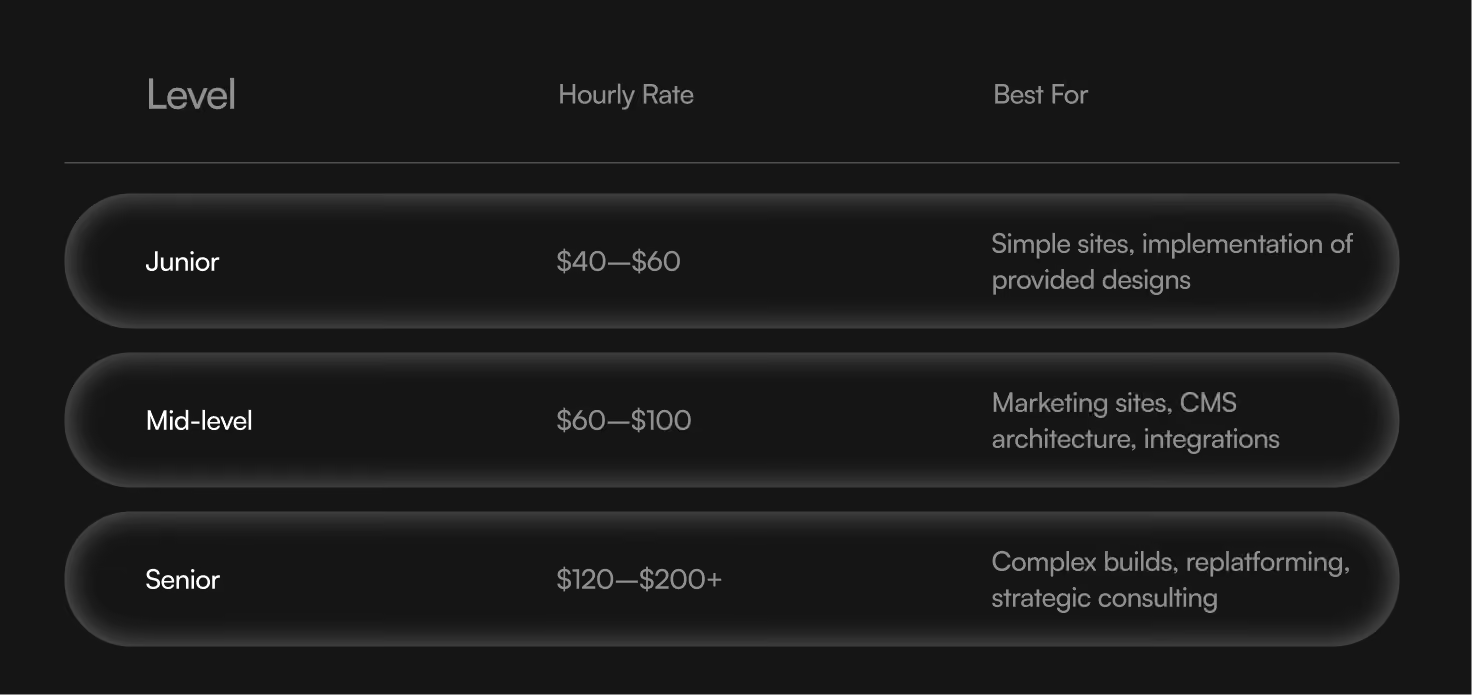
Full-time salary bands in US/EU markets range from $70k–$140k annually depending on seniority, location, and company stage. Startups often pay equity alongside lower base; agencies pay market rate with less equity.
Project fees span from low four-figures for simple single-page sites to five-figures for complex multi-page builds with CMS, integrations, and custom development. The cost reflects not just hours but expertise—premium designers bring faster delivery, stronger conversion results, and strategic input that junior designers cannot provide.
Typical Project Timelines and Deliverables
Setting timeline expectations early prevents frustration. Webflow accelerates development compared to traditional code-only builds, but complex projects still require adequate time.
Typical durations:
- Simple single-page or micro-sites: 1–2 weeks
- Marketing sites under 10–15 pages: 3–6 weeks
- Full brand redesigns and platform migration: 8–12+ weeks
Webflow’s visual nature shortens feedback cycles. Stakeholders see real progress in the actual site rather than static mockups, enabling faster iteration and fewer surprises at launch.
Key project phases:
- Discovery and strategy (Week 1): Define goals, review existing assets, align on scope
- Wireframes (Week 1–2): Structure and layout before visual design
- Visual design (Weeks 2–3): Full fidelity designs in Figma
- Webflow build (Weeks 3–6): Implementation in Webflow Designer
- Content migration: Moving copy, images, and structured data
- QA and testing: Cross-browser, cross-device validation
- Launch: Go-live and immediate monitoring
Migrating Existing Sites to Webflow
Companies in 2024–2026 increasingly pursue platform migration from WordPress, custom code stacks, or legacy systems to Webflow. The motivations: improved security, faster performance, and marketing team control over updates without developer dependencies.
Migration requires careful planning to preserve organic traffic and SEO equity. URL mapping, 301 redirects, and metadata transfer prevent ranking drops during the transition. A well-executed migration can actually improve performance and search visibility simultaneously.
Migration process steps:
- Audit existing site: pages, content, URL structure, current performance
- Define new information architecture and design approach
- Set up Webflow CMS structures matching content needs
- Rebuild layouts in Webflow with responsive optimization
- Migrate content: copy, images, metadata
- Implement 301 redirects from old URLs to new
- SEO audits before and after launch
- QA across devices and browsers
- Launch with monitoring for crawl errors
A typical B2B SaaS site with 50 pages moving from WordPress to Webflow takes 8–10 weeks with proper planning and dedicated resources.
Why Companies Hire Webflow Designers
The strategic value extends beyond “we need a website.” Companies hire Webflow designers to enable faster marketing iterations, reduce engineering dependency, and maintain a polished brand presence that evolves with business growth.
Enterprise teams and high-growth startups rely on Webflow designers to keep sites aligned with product and brand evolution. Without dedicated designers comfortable working in Webflow, marketing sites lag behind company growth—launching products before landing pages exist, or running marketing campaigns with outdated messaging.
Skilled designers combine UX thinking, visual design proficiency, front-end knowledge, and basic SEO understanding. This combination delivers professional websites that drive real results, not just aesthetics.
Common use cases:
- Product launch landing pages with tight deadlines
- Pricing experiments with conditional visibility
- Content hubs and resource libraries scaled through CMS
- Event microsites for conferences or campaigns
- Localized sites for new market expansion
Career Path for Webflow Designers

The Webflow designer career path offers multiple trajectories. Designers can grow from junior implementers to senior strategists, Webflow technical leads, or creative directors overseeing entire website portfolios.
Opportunities span agencies, in-house roles at product companies, and fully remote freelance or consulting careers. A Webflow certified partner agency offers different growth than an in-house SaaS marketing team, but both provide valuable experience.
Building a strong portfolio matters more than credentials. Live sites demonstrate capability; case studies with metrics prove business impact. Contributing to the Webflow community through clonables, templates, or tutorials builds reputation and can generate additional income.
Staying current differentiates career-focused designers. Webflow continuously releases features—Logic, localization, new CMS capabilities. Designers who master new tools first command premium rates and attract better opportunities.
Possible career trajectories:
- Agency path: Junior → Mid → Senior → Creative Director
- In-house path: Designer → Lead Designer → Head of Brand/Web
- Freelance path: Contractor → Consultant → Agency founder
- Specialist path: Migration expert, e-commerce focus, or enterprise partners work
Finding Webflow Jobs and Talent
Designers can find roles through Webflow-specific job boards, LinkedIn, and specialist communities. Optimizing your LinkedIn profile with “Webflow designer” keywords improves discoverability. Showcasing Webflow projects clearly—with live links, not just screenshots—attracts inbound opportunities.
Hiring managers can tap into curated talent networks that list thousands of Webflow designer and Webflow developer roles globally. Specialist job boards filter by experience level, location, and project type, making it faster to hire Webflow developers and designers who match specific needs.
Places to find Webflow talent or opportunities:
- Webflow.jobs and similar specialized job boards
- LinkedIn with targeted “Webflow designer” keyword searches
- Webflow community forums and Slack groups
- Agency networks focusing on Webflow certified partner shops
- Portfolio platforms where designers showcase live work
- Direct outreach to designers with relevant industry experience
Conclusion: Making the Most of Webflow Designers in 2026
The Webflow designer role has matured from niche specialty to essential marketing capability. Companies that hire well gain faster iterations, stronger brand presence, and reduced dependency on engineering resources. Designers who develop deep platform mastery alongside genuine design skill command premium rates and abundant opportunities.
Success requires matching designer level to project complexity, setting realistic expectations around cost and timelines, and recognizing Webflow as a strategic business decision—not just a technology choice.
Your next steps:
- Refine your job description with specific requirements and compensation ranges
- Review portfolios with new criteria: live sites, measurable results, CMS complexity
- Plan your next project or migration with a qualified Webflow expert
- If you’re a designer: build live sites, document your process, and stay current with platform features
Whether you’re scaling a marketing team or building your design career, clarity on what makes a strong Webflow designer accelerates everything that follows.

Quincy Samycia
As entrepreneurs, they’ve built and scaled their own ventures from zero to millions. They’ve been in the trenches, navigating the chaos of high-growth phases, making the hard calls, and learning firsthand what actually moves the needle. That’s what makes us different—we don’t just “consult,” we know what it takes because we’ve done it ourselves.
Want to learn more about brand platform?

If you need help with your companies brand strategy and identity, contact us for a free custom quote.
We do great work. And get great results.
+2.3xIncrease in revenue YoY
+126%Increase in repurchase rate YoY


+93%Revenue growth in first 90 days
+144% Increase in attributed revenue


+91%Increase in conversion rate
+46%Increase in AOV


+200%Increase in conversion rate
+688%Increase in attributed revenue